
 SIGN UP FOR STELLAR MAIL
You’ve probably seen reCAPTCHA before—the quick “I’m not a robot” checkbox or those image grids asking you to spot traffic lights or bicycles in blurry photos. It’s a familiar experience for most web users these days, but behind it is a powerful tool that helps protect a website from spam, bots, and fake submissions.
Today, Google’s reCAPTCHA is a pillar of online security, working quietly in the background to keep automated attacks out and let real people in, making your forms, login pages, and overall site experience more secure. Since spam activity can affect everything from your inbox to your site performance, having a reliable layer of protection matters more than ever.
So, what exactly is reCAPTCHA, and how does it work? Do you need it on your website? (Short answer: yes.)
What is reCAPTCHA, and how does it help keep a website secure?
ReCAPTCHA is a spam-prevention tool created by Google that helps protect your website from spam and abuse. It determines whether a user is human or a bot before allowing access to specific actions, like submitting a contact form, creating an account, or logging in. It acts as a gatekeeper for websites and sensitive digital information.
What’s interesting is that the earliest version of reCAPTCHA had a completely different purpose. When it was developed in the early 2000s, it helped digitize books and other texts, such as The New York Times archives, by asking users to interpret hard-to-read text. Now, its main purpose is website security: keeping bots out and letting real users in.
Why reCAPTCHA matters for your website
You might be surprised at just how many spam bots try to interact with your site every day. Bots constantly try to submit forms, create fake accounts, run password-guessing attacks, or scrape content — all of which can bog down your website and create headaches for your team. Without a spam-prevention tool in place to filter them out, you could deal with:
- Dozens (or even hundreds) of fake form submissions
- Malicious login attempts
- Bogus comments or sign-ups
- Increased server load and bandwidth usage
reCAPTCHA helps by silently filtering out unwanted visitors while letting real users through without hassle. It helps block automated spam, fake submissions, and bot-driven attacks before they ever reach your inbox or database. That means fewer junk entries to sort through, fewer security risks, and less time spent finding real people interacting with your website.
It’s also worth noting that reCAPTCHA can positively impact your SEO and search visibility. Too much spam can hurt user experience, and those signals can eventually affect your rankings. Clean, protected forms create a smoother path for real visitors — something search engines and users both appreciate.
Much like having a “Protected by ADT” sign in front of your home, reCAPTCHA sends a clear message that your website takes security seriously. The added trust it provides can go a long way with new and returning visitors.
The different types of reCAPTCHA
Google offers several versions of reCAPTCHA, and each one approaches spam protection in a slightly different way. The good news: some versions run entirely in the background, so most visitors never see a challenge.
Here’s a quick breakdown of how each one works.
reCAPTCHA v2 ("I'm not a robot" checkbox)
This is the classic version that most people recognize from across the web. It’s been around for years and has become the most familiar way to confirm that a real person is interacting with your site.
In practice, it works like this:
- Users click a simple checkbox to confirm they’re human
- If activity seems suspicious, an image puzzle may appear
Pros: Familiar and highly effective
Cons: Adds a small amount of friction to the experience
reCAPTCHA v2 Invisible
Invisible v2 takes the same protective approach as the classic version but removes the visible checkbox. Most visitors don’t see anything at all unless their behavior triggers a challenge.
Here’s how it behaves:
- No checkbox or puzzle for typical visitors
- A challenge appears only if the system detects unusual activity
Pros: Smooth, low-friction experience for almost everyone
Cons: Requires some front-end configuration
reCAPTCHA v3 (Score-based and fully invisible)
reCAPTCHA v3 runs entirely in the background. Instead of showing challenges, it evaluates each interaction and assigns a score reflecting how suspicious the activity appears to be. Websites can then decide what to do with low-scoring traffic.
v3 handles protection by:
- Monitoring activity behind the scenes with no challenges
- Assigning a score from 0.0 to 1.0 based on behavior
Pros: Completely seamless for users
Cons: Needs more back-end logic to act on the scores
How to choose the right version for your site
Each version of reCAPTCHA helps protect your website from spam, but the right fit depends on how your forms work and how much interaction you want your visitors to have. Some websites need a visible checkpoint, while others benefit from something invisible in the background.
Here’s a quick guide to help you decide:
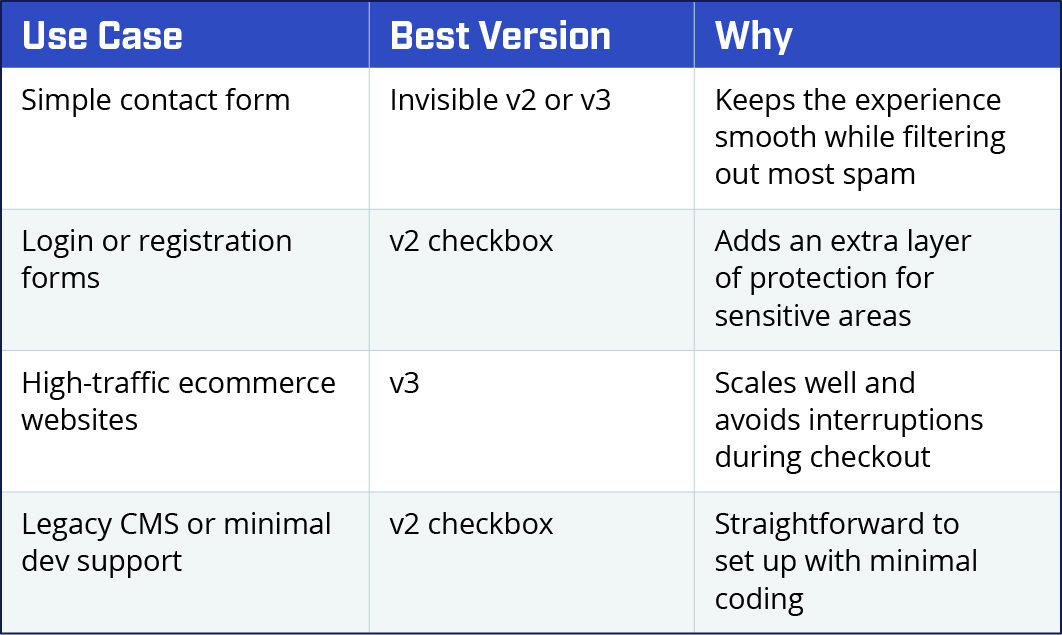
If you’re not sure, Invisible v2 is often a great starting point, because it offers strong spam protection while staying out of the way for the vast majority of visitors.
How to implement reCAPTCHA on your site
Adding reCAPTCHA to your website is usually a quick process, and once it’s in place, it provides steady protection with very little maintenance. The setup looks slightly different depending on your platform, but the overall steps are simple.
Here’s what the process typically includes:
- Register your site in Google’s reCAPTCHA admin console.
- Choose the version you want (v2 or v3) and enter your domain name.
- Google will give you a site key and secret key—you’ll need both.
- Add the necessary scripts to your website (or use a plugin if you’re on WordPress or Shopify).
- Test your forms to make sure everything works smoothly.
If you’re a Stellaractive client, we can handle all of this for you. Just let us know you’re interested in adding reCAPTCHA to your site.
Common questions clients ask about reCAPTCHA
Is reCAPTCHA free?
Yes, all versions of reCAPTCHA are currently free for up to 10,000 assessments (reCAPTCHA submissions) per month. After that, Google charges a monthly fee based on usage.
Will it annoy my visitors?
Not if you choose the correct version. Invisible v2 and v3 work in the background, virtually unnoticeable to most users.
Can bots still get through?
No tool blocks every single automated attempt, but reCAPTCHA is extremely effective at stopping almost all spam and bot activity.
Does reCAPTCHA slow down my website?
Not in a noticeable way. The scripts are lightweight and load asynchronously, so any impact on speed is minimal.
Do I need reCAPTCHA on every form?
It’s smart to add reCAPTCHA to any form that collects personal information, allows account creation, or is frequently targeted by spam. Contact forms, login pages, and registration forms are the most common places to use it.
Get reCAPTCHA and start protecting your website
Adding reCAPTCHA is one of the simplest ways to reduce spam, keep bots out, and strengthen your website’s overall security. It protects your forms and login areas, reduces spam, and helps build trust with your users without getting in their way.
If you’re a Stellaractive client and want help setting up eCAPTCHA or choosing the right version, our team can take care of the entire process for you. We’ll walk through the options, add the keys, and confirm everything is working as it should. You can reach us at 503-384-2413, or simply let your project manager know you’d like to add reCAPTCHA to your site.
If you’re not yet working with us but looking for a website partner, feel free to request a quote, and someone from our team will be in touch.