
 SIGN UP FOR STELLAR MAIL
Over the past several months, we’ve seen a noticeable increase in fake Facebook and Meta messages targeting business pages and account owners. Many claim a page is about to be disabled, restricted, or removed due to a policy violation, copyright issue, or account problem.
At first glance, they can look legitimate. Some even use official-sounding language or branding that appears to come from Meta itself. In many cases, they’re phishing attempts designed to get access to business pages, advertising accounts, or login credentials.
This guide will help you recognize what these scams look like so you can avoid falling victim to them.
Quick answer: If you receive a Facebook or Meta message claiming your page will be suspended, disabled, or restricted, verify the issue directly through Meta Business Suite before clicking any links. Many of these messages are phishing scams.
What is a Facebook Business Manager scam?
A Facebook Business Manager scam is a form of phishing where someone attempts to gain unauthorized access to a business’s Facebook or Meta assets. This can include Facebook pages, Business Manager accounts, Instagram profiles, advertising accounts, or even connected payment methods.
These scams usually rely on urgency. Messages may warn that a page is about to be suspended, that policy violations have been detected, or that verification is required immediately.
Once someone clicks a link or enters login details, scammers can gain access and potentially take control of business assets, run unauthorized ads, or remove existing administrators. Even businesses that are not actively advertising can still be targeted simply because they have a Facebook page or historical account access tied to their brand.
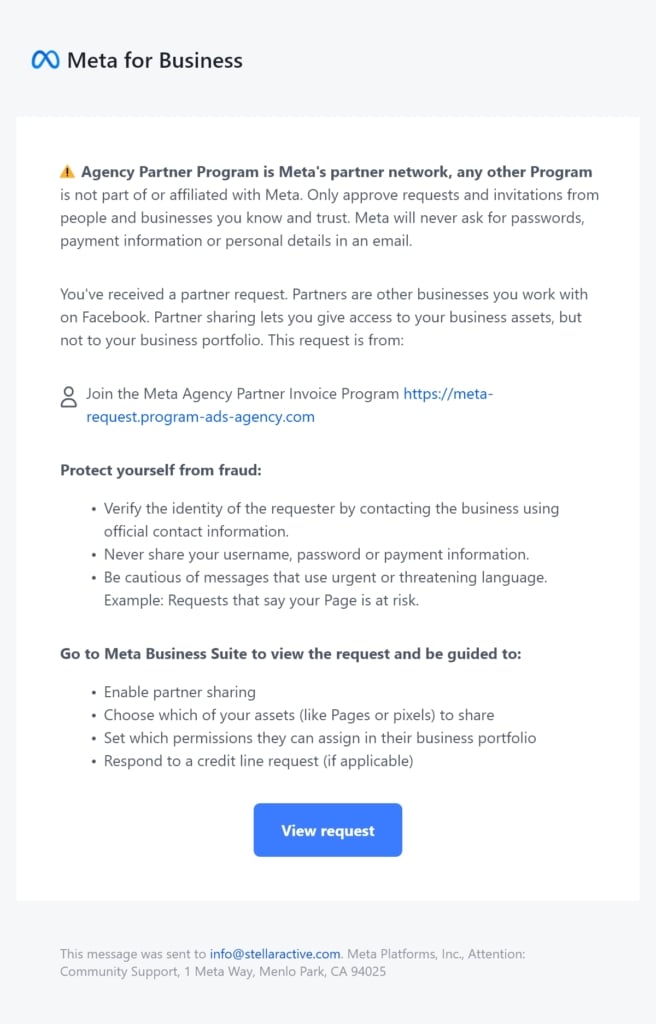
Common warning signs of Facebook and Meta phishing messages
Many Facebook and Meta phishing scams share the same warning signs. If you receive a message about your page, account, or Business Manager, watch for:
- Urgent language such as “final warning,” “account suspension,” or “immediate action required.”
- Unofficial sender names like “Meta Support,” “Facebook Security Team,” or “Business Compliance Center.”
- Suspicious links that look similar to Facebook or Meta URLs but contain extra words, unusual domains, or slight spelling differences.
- Unexpected access requests asking for Business Manager permissions, page access, or account verification.
- Poor grammar or awkward phrasing that feels inconsistent with official Meta communications.
- Threats of page removal or account restrictions designed to pressure you into acting quickly.
These tactics are meant to create urgency and encourage people to click before taking a closer look. If a message contains one or more of these warning signs, it’s best to verify the issue directly through Meta Business Suite or Facebook rather than interacting with the message itself.
How to tell if a Facebook or Meta warning is legitimate
If you’re concerned about a Facebook account issue, the safest approach is to avoid using links inside a message.
Instead, go directly to Facebook or Meta platforms and check notifications through official channels such as:
- Facebook Notifications
- Meta Business Suite
- Account Quality
- Business Settings
If something is legitimate, it will appear inside the account itself.
This simple step helps avoid most Meta phishing scams, which rely on users clicking external links rather than verifying information directly through Meta.
What to do if you receive a suspicious Facebook or Meta message
If you receive a message claiming your Facebook page is at risk, your account violated policies, or immediate action is required, pause before clicking anything.
These messages are becoming increasingly common, and in many cases they’re not legitimate. They’re designed to look official and create urgency so the recipient reacts quickly without verifying the source.
When something like this shows up, do not interact with the message directly. Instead, avoid clicking any links or buttons inside it.
If your business has a Facebook page or an advertising presence managed by Stellaractive, simply forward the message to us before taking any action. We can quickly confirm whether it is legitimate or a phishing attempt.
If a link was already clicked or information was entered, the safest next step is to immediately change your password and review account access and permissions. Acting quickly can help limit any potential issues.
Why Facebook Business Manager scams are increasing
Facebook and Meta accounts have become a frequent target for phishing scams because so many businesses rely on them to stay connected with customers, run ads, maintain their online presence, and generate leads.
These accounts often have multiple administrators, connected payment methods, and valuable business assets attached to them, which can be attractive targets for scammers
Even if a business is not actively running ads, there is often still a Facebook page, account access history, or connected users that scammers attempt to exploit.
How to protect your business from Facebook and Meta scams
The most important rule: if a message creates urgency or pressure, it should always be treated with caution.
Legitimate Facebook or Meta account issues will always be visible directly inside your account or through official Meta Business tools — not just through a message asking you to click a link or verify information immediately.
Taking a minute to pause, verify, or ask for help can prevent unauthorized access to your Facebook page, advertising account, or business assets. If something feels unusual or unexpected, it is always worth double checking before responding.
If you receive a suspicious Facebook or Meta message and aren’t sure whether it’s legitimate, contact Stellaractive before taking action. We’re happy to help verify the request and make sure your business accounts stay secure.